A buyer asks ChatGPT to recommend a company like yours. A competitor gets named. You don't.
Your SEO report still looks green. Google rankings haven't moved. But somewhere in your setup — often a single line someone added to block AI bots in robots.txt — the crawlers AI assistants rely on are shut out. And you may not have meant to block those.
That gap is more common than most owners realise. The fix usually starts with understanding what you actually blocked — and what you didn't mean to.
What robots.txt does (in plain English)
robots.txt is a simple instruction file at the root of your website — yoursite.com/robots.txt — that tells automated visitors (bots) what they may read.
Think of it as a front-door sign for machines. It doesn't lock the door. Reputable AI companies generally respect what it says, but it's a guideline, not a security wall. Bad actors can ignore it.
For business owners, robots.txt matters because one wrong line can tell AI systems to stay away — while Google search keeps working normally. That's the "green SEO report, invisible to AI" pattern — and it often traces back to this file.
Not every AI bot does the same job
Here's the part most guides skip — and it's why so many sites block the wrong thing.
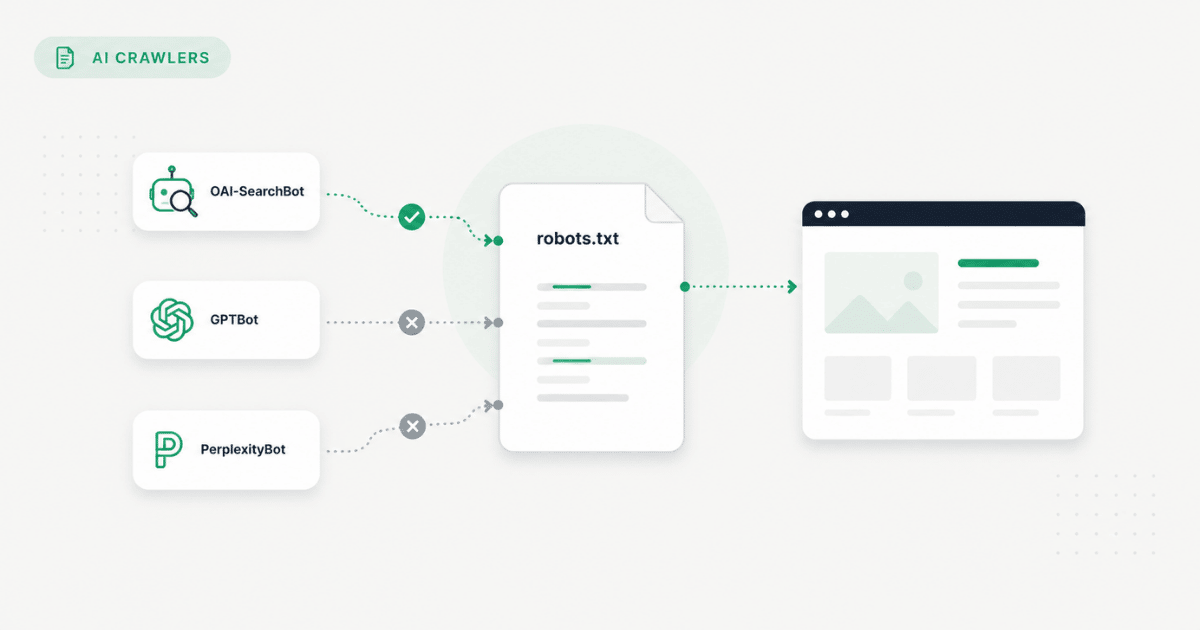
AI companies don't send one generic bot. They send different automated visitors for different purposes. If you want to block AI bots in robots.txt without hurting your business, you need to know which is which:
Blocking a training crawler stops your content from being used to build models. Blocking a search crawler can remove you from AI recommendations entirely — even when you rank well on Google.
OpenAI alone runs multiple crawlers with different jobs. Google's Google-Extended controls Gemini training — it's separate from Googlebot, which powers traditional search and AI Overviews. Block Googlebot by mistake and you hurt Google traffic. Block Google-Extended and you only opt out of training.
A common pattern: a B2B services firm blocks GPTBot in robots.txt after reading a "protect your content" article. Rankings stay stable. But their Cloudflare security layer also rejects OAI-SearchBot — the crawler ChatGPT uses for live search. Nothing looks broken in SEO tools. AI simply can't read the site. The block was meant to stop training; the business accidentally disappeared from the channel buyers actually use.
How to block AI bots in robots.txt
If your goal is to stop AI training crawlers while keeping normal search working, the approach is straightforward:
- Open your robots.txt file — through your CMS (WordPress, Shopify, Wix, Webflow) or your hosting panel.
- Add a separate block for each training crawler you want to stop — one User-agent section per bot, not one giant wildcard rule.
- Use current bot names — ClaudeBot (not the older Claude-Web string, which many crawlers no longer use), GPTBot, Google-Extended, and others from the table above.
- Keep search crawlers allowed unless you genuinely want to vanish from AI answers.
- Never block Googlebot when you only meant to block AI training.
Each block follows the same pattern: name the bot, then disallow all paths. Your CMS or developer handles the exact syntax — the strategic decision (which bots, which paths) is what matters.
One technical note: if you add multiple blocks for the same bot, only the first one counts. Keep the file clean and consolidated.
The mistake most business sites make
After scanning hundreds of business websites, the same pattern shows up again and again: robots.txt or a security layer is blocking AI readers, and the owner had no idea.
The biggest error isn't blocking AI bots in robots.txt. It's blocking without knowing the full picture.
Three places blockers hide:
- Cloudflare and other security layers. Many sites use a security service that can override or add to your robots.txt — or reject specific bots before they ever read your file. Cloudflare's AI Crawl Control feature, for example, can inject broad AI blocks that your origin server never shows you in the CMS.
- Wildcard rules. A Disallow: / under User-agent: * blocks every bot — including the AI search crawlers you need for visibility.
- Outdated bot names. Blocking Claude-Web while ClaudeBot still crawls gives a false sense of control. The file looks correct; the training crawl continues.
Industry audits back this up. The split most growth-focused businesses aim for — block training, allow search — is not what most files actually do:
- 41% of sites block training crawlers; only 9% block search-and-citation crawlers (Crawlix, 2026 audit of 500 sites)
- 71% of major news sites block at least one live retrieval bot (BuzzStream publisher study)
- 49% block OAI-SearchBot — ChatGPT's search crawler (BuzzStream)
- On top domains, GPTBot appears in disallow rules on 7.8% of robots.txt files, but Google-Extended on only 5.6% (Cloudflare)
Many sites block the name they recognise and miss the bots that actually shape training or visibility.
Block training bots vs. stay visible in AI search
There's no universal right answer. It depends on what you're protecting and what you're trying to grow.
Most B2B and services firms land in the middle row: they want AI assistants to recommend them, not train on their proprietary content. That means allowing trusted search crawlers, fixing accidental blocks, and pairing robots.txt with machine-readable business facts — not a blanket ban.
For the llms.txt piece, see why competitors show up first in AI answers.
How to check whether AI bots are blocked on your site
You can open yoursite.com/robots.txt in a browser right now. That tells you what the file says. It does not tell you whether your security layer, CDN, or hosting platform is silently overriding it.
Checking the file by hand is a start. A full AI visibility checker tells you whether AI systems can actually reach your pages — the question that matters when competitors show up in ChatGPT and you don't. Most monitoring tools stop at a score; GEO Fix generates the corrected robots.txt and CMS install steps when you need them.